ShotVista + Stripe: get paid for listing photos
Connect a Stripe Express account in ShotVista and your clients can pay on the delivery page before downloading, or when they book a shoot through your storefront. Client companies you approve can instead pay by invoice: Stripe issues the invoice from your account with the payment terms you set. The money goes to your Stripe account minus a 5% ShotVista platform fee per client payment (at least 0.50 in the payment currency).
- Who it is for
- Real estate photographers and studios who want to be paid before photos are released, instead of chasing invoices.
- Plan
- Available on every plan.
What it does
- Require payment on a delivery: the client pays the amount you set before the download buttons unlock.
- Take payment when an agent books a package and add-ons through your storefront, with your tax rate added if you charge tax.
- Let client companies apply for invoice payment on your booking form. You approve each one with payment terms (7 to 60 days), an optional credit limit and an optional block while an invoice is overdue.
- Bill approved companies by invoice: when they book, Stripe Invoicing creates the invoice on your connected account, emails it with a hosted payment page and PDF, and ShotVista shows whether it is open, paid, overdue or void. You can resend or void it from Orders, Invoicing.
- Charge in the currency you choose: USD, EUR, GBP, NOK, SEK, DKK, CAD, AUD or NZD.
- See transactions and payouts in Settings, Payments, and open your Stripe dashboard from there.
When it runs
- A client opens a delivery that requires payment and clicks pay: a Stripe Checkout page opens.
- Stripe confirms the payment: the delivery unlocks for download. Until then the client sees watermarked previews only.
- An agent completes a storefront booking that has a price: the booking is paid through Stripe Checkout.
- An approved company books and chooses Pay by invoice: the booking is confirmed and Stripe emails the invoice to the company’s billing address.
- Stripe reports that an invoice was paid, voided or marked uncollectible: the status updates on the order and in Orders, Invoicing.
Set it up
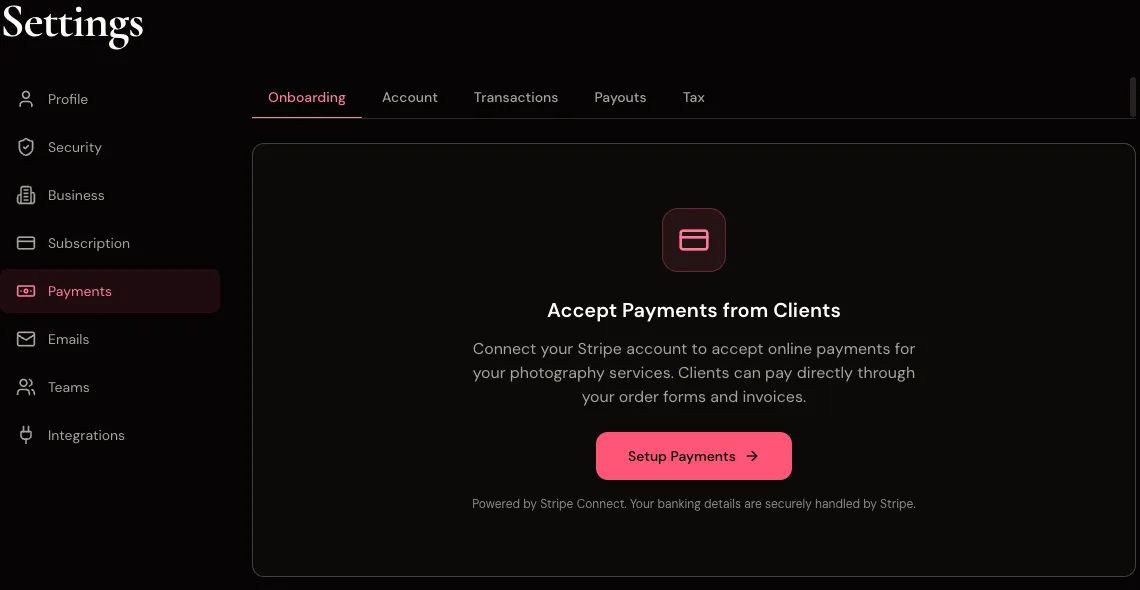
- Open Settings, Payments in the ShotVista dashboard.
- Click Setup Payments. ShotVista creates a Stripe Express account for your email and sends you to Stripe.
- Complete Stripe’s onboarding (business details, bank account, identity check). Stripe returns you to ShotVista when it is done.
- Set your business currency and, if you charge it, your tax rate in Settings, Business.
- On a listing, open the delivery settings, turn on payment before download and enter the amount.
- To invoice companies, open Orders, Invoicing, turn on applications and set your default payment terms. Approve each application as it comes in.
Example
You deliver a 25-photo listing and require 250 EUR before download. The agent pays by card on the delivery page; your Stripe balance receives 237.50 EUR (250 EUR minus the 5% platform fee), paid out to your bank on your Stripe payout schedule, and the downloads unlock.
Limits
- Clients can only pay once your Stripe account has finished onboarding and can receive payouts. Until then the delivery page says online payment is not available yet and downloads stay locked; storefront bookings are still accepted, without payment.
- Before payment the client sees watermarked previews (1200 px, no originals or videos).
- Delivery and booking payments are card payments through Stripe Checkout. Invoices are only for companies you have approved, and only for bookings through your own booking form (not team location pages).
- Invoices are issued on your own Stripe account, so for invoice payments Stripe’s processing fee comes out of your Stripe balance. Which payment methods the invoice page offers (card, bank transfer) follows Stripe’s settings for your account.
- Invoicing needs a Stripe account that has finished onboarding with card payments active. Until then the Pay by invoice option does not appear on your booking form.
- Refunds and disputes are handled in your Stripe dashboard, not in ShotVista.
- Stripe’s own country availability and verification rules apply to your account.
Troubleshooting
- Stripe sent me back to ShotVista before I finished.
- Click Setup Payments again. ShotVista reuses the same Stripe account and creates a fresh onboarding link, so you continue where you stopped.
- The client says the pay button does nothing.
- If the page says online payment is not available yet, finish Stripe onboarding under Settings, Payments. Otherwise check that the delivery has payment turned on with an amount and has not already been paid. If it still fails, email [email protected] with the delivery link.
- A payment shows in Stripe but the delivery is still locked.
- Ask the client to reload the delivery page; downloads unlock once ShotVista has recorded the paid order that Stripe confirms. If it stays locked, contact support with the Stripe payment ID.
Checked against the product in October 2026. Questions: [email protected].
Questions
- Does ShotVista take a cut of client payments?
- Yes. ShotVista keeps 5% of each client payment made through a delivery or booking page, with a minimum of 0.50 in the payment currency. For bookings the fee is calculated on the amount before tax. Card payments are created on ShotVista’s Stripe platform and transferred to your account, so Stripe’s card processing fee is charged to ShotVista, not deducted from your 95%. Invoices are the exception: they are issued directly on your Stripe account, so Stripe’s fee for a paid invoice comes out of your balance, and the 5% platform fee is taken from the invoice as well.
- Can a client company pay by invoice instead of by card?
- Yes, if you approve it. Turn on applications under Orders, Invoicing; the company confirms its email with a one-time code and applies from your booking form with its company details, org or VAT number and billing email. Once you approve it with payment terms, it can choose Pay by invoice when it books, and Stripe sends the invoice from your account.
- Do I need my own Stripe account?
- You need a Stripe Express account, which ShotVista creates for you during setup. If you already use Stripe for other things, the Express account is separate.
- Is my ShotVista subscription billed through the same account?
- No. Your ShotVista plan is billed by ShotVista through Stripe in US dollars; client payments go to your own connected account.
Try ShotVista on one of your photos
New accounts get 2 free credits, enough for one photo in 4K. No card required.
Try 1 photo free